Now Easily Add Room Control to All Sorts of User Interfaces
Mira Connect touchscreen AV control systems are used by customers world-wide because of their ease-of-use, ease-of-setup, and powerful remote management and monitoring capabilities.
Mira Connect room control is now available as a software application for Windows 10 and newer PCs, providing the same AV control functionality as Mira Connect touchscreen appliances, including a professional user interface that can be accessed remotely from a browser on a computer.
Mira Connect software also includes an application programming interface (API) that extends its room control capabilities to other user interface devices and applications. Just as Mira Connect controls third-party AV products using the product APIs, now Mira Connect has its own API that other applications can use to leverage Mira Connect’s control capabilities.
The Mira Connect API provides endless opportunities to create new user interfaces for Mira Connect, from low-cost physical keypads to custom applications, including any touch panel running the Zoom Rooms Controller application.
This article explains:
- what an API is
- what the Mira Connect room control API is
- what you can do with the Mira Connect API
- the benefits to integrators and users of using the API, and
- an example of how a room can be controlled with a network-enabled programmable keypad
What is an Application Programming Interface (API)?
An API, or application programming interface, is a set of easy-to-use commands that make a device or system perform the tasks for which the system was designed.
API commands allow any application to make simple requests and have the underlying device execute one or more complex tasks or sequence of tasks.
The real beauty of an API is that the application using the API doesn’t need to know how to do the underlying tasks. It simply needs to tell the underlying system what it wants it to do, and the system will do it.
A familiar analogy for an API is putting a key into your car’s ignition and turning the key to start your engine. You don’t need to know how the car works, you just need to use the interface provided to tell the car to start, which only requires inserting and turning the key in the ignition.

Software APIs work similarly with high-level commands initiating activities that seamlessly handle the complexity and the details of controlling the underlying systems.
What Does the Mira Connect Room Control API Do?
Provides Room-Level vs. Device-Specific Control
Mira Connect’s room control API defines room-level commands (as opposed to device-specific commands), such as muting microphones, selecting sources for displays, dialing audio calls, controlling sound reinforcement zones, repositioning cameras, making volume adjustment, and more.
The API commands operate at the room level and are not concerned with the equipment in the room, only the capabilities of the equipment in the room.
For example, when you are using Mira Connect’s room control API, it doesn’t matter whether the system has a Biamp, Symetrix, QSC, Yamaha, or other brand of digital signal processing audio device. The Mira Connect room control API commands for muting, adjusting volume, dialing calls, will behave exactly the same way for all of those products. Mira Connect software takes care of the details of translating the room-level commands into how to connect to and control the specific brands of equipment. You can choose the devices that best meet your needs without having to become an expert in every API.
The Mira Connect Room control API provides an easy-to-use set of commands that allow other applications to control room-level functions, including:
- Muting microphones
- Adjusting the room volume
- Recalling camera presets
- Dialing audio and video conference calls
- Turning on or off lights
- Opening and closing blinds
- Routing video sources to displays
- And much more
Provides Same Features as Mira Connect Touch Panels
Any feature that can be controlled using a Mira Connect touch panel is accessible through the Mira Connect room control API.
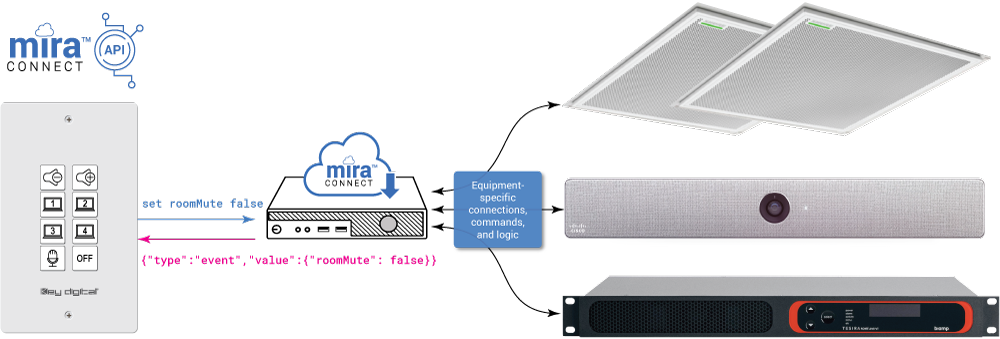
For example, as shown in the following figure, a single set roomMute false command sent from a push-button keypad to Mira Connect software will tell Mira Connect to unmute multiple devices at once, including array microphones, a video codec, and a DSP audio device.
Mira Connect software is responsible for all the connections and communications to the AV equipment in the room and provides status information back to the application as JSON-formatted responses.
Discovers the Room’s Capabilities
Applications using Mira Connect’s room control API also gain the ability to discover the capabilities of the room, which allows the applications to dynamically create user interfaces based on the capabilities of that specific room.
For instance, an application can use the room control API to query how many displays are in the room and then present the correct number of display controls in a user interface accordingly. Or the application can determine if there are one or more telephony interfaces available on equipment in the room that are capable of making VoIP calls. Or whether the system can dial video calls.
Mira Connect’s discovery of the room’s capabilities means that applications can be written once and work across any Mira Connect-controlled room regardless of the room’s capabilities and equipment — saving time, lowering cost, and improving the effectiveness of the programmer.
What Can You Do With Mira Connect’s Room Control API?
Perhaps an easier question to answer is what can’t you do with Mira Connect’s room control API? Anything you can do with Mira Connect appliances, you can do it with the room control API.
Mira Connect’s room control API creates new opportunities for how users can interface with, and control, rooms that have a Mira Connect AV control system running on a PC. Now users can access all the features supported by Mira Connect control through many third-party user-interface or devices, including devices and systems you may already own, even legacy control systems.
Plus, you get access to Mira Connect’s remote control feature, which is designed to make it easy for AV/IT support teams to provide remote assistance — reducing the time and resources required to manage AV systems across distributed locations.
What follows are just a couple of examples of what you can do with Mira Connect’s API.
Add Room Controls to a Network-Enabled Keypad
Users can leverage low-cost user interface devices (such as network-enabled keypads) in the room to control the audio levels, mute microphones, dial directory entries, select video sources, or anything else that Mira Connect can do.
You can use one or more keypads to extend the room’s control options while still having access to Mira Connect’s native user interface via a browser. Keypads can be placed next to a display, near light switches as you come into a room, behind a bar, in a podium or lectern, or anywhere that makes sense. Each keypad can be configured differently or the same to provide specific control options depending on your requirements.

Add Room Control Capability to Any Zoom Rooms Controller
Users may already have a dedicated touchscreen for their video conferencing systems from Logitech, Neat, Poly/HP, Yealink, or other manufacturers for controlling their Zoom Rooms videoconferencing systems.
Instead of adding a second touch panel for controlling the rest of the AV equipment in the room, Mira Connect features can be added to every Zoom Rooms system using the Zoom Rooms JSON native control available with all Zoom Rooms controllers. To make this easy, Mira Portal (Mira Connect’s cloud-management platform) can automatically generate the JSON code required to add room control to every existing Zoom Rooms touch panel.
The Mira Connect room control API commands are the basis of our generated Zoom Rooms Native Room Controls JSON configuration file, so you don’t need to program it yourself. That’s a big win for everyone!

See our Zoom Rooms JSON article for details.
Add Mira Connect Room Controls to an Existing Third-Party Control System
Traditional control systems from other manufacturers can be programmed to do just about anything but are often complicated and time-consuming to change, require specialized programmers, and are expensive to maintain and update as your needs evolve.
What if you could keep your existing programmable control equipment and extend its capabilities by adding Mira Connect’s capabilities to it? You can do exactly that by using Mira Connect Software’s room control API to program simple commands into your controller that tell Mira Connect to do the complicated stuff “under the hood.”
Client example — An innovative AV team from a prestigious Ivy League university extended their lecture rooms’ legacy Crestron control systems with significant new capabilities. They used Mira Connect software to make it easy for professors to dial Zoom calls and manage the remote student participants. Their Crestron system was updated to use the Mira Connect room control API to add Zoom call capabilities and provide participant management features — without having to deal with any of the Zoom Rooms details. The resulting system makes it easy for the faculty to do what they do best — focus on their students.
See the article to learn more.

Benefits of Mira Connect Room Control API
The Mira Connect room control API provides programmers and system integrators tremendous flexibility and power for building their own applications and user interfaces without having to deal with, troubleshoot, and understand different underlying equipment-specific APIs and network connection requirements.
Mira Connect control systems are designed to manage advanced tasks — such as Wake-on-LAN, syncing mute states across DSPs and array microphones, automatically powering on displays, triggering screen motion, dialing calendar invites, and much more. These tasks are all accessible now via simple room-level commands to the Mira Connect software.
The benefits of using Mira Connect’s room control API include:
- Enables new applications and user interfaces while lowering the cost for adding room control to any AV application.
- Reduces setup time, complexity, and troubleshooting for creating new applications because it is not necessary to know the API syntax of every device you want to control. The Mira Connect room control API works the same regardless of the underlying equipment used in the room since Mira Connect handles all the underlying device-specific details.
- Allows you to extend the capabilities of simple user interfaces because Mira Connect can control equipment over TCP, UDP, HTTP, HTTPS, SSH, and perform advanced features that aren’t easy, or even possible, to configure on simple user interface devices, including sending Wake-on-LAN packets to displays, scheduling room power-off, or simply synchronizing mute states across multiple devices.
- Users have more flexibility to create custom user interfaces to meet the needs of their customers. Need a low-cost way to make it easy for users to switch sources while at the podium? Add a keypad.
- In addition to any custom user interface, users can access to Mira Connect’s professionally designed native interface through the browser of their PC or mobile device.
Example — Setting Up a KeyDigital Keypad with Mira Connect Room Control
As an example application of the Mira Connect room control API, let’s configure an 8-button keypad, such as the KeyDigital KD-WP8-2 shown below. This keypad can send TCP commands to devices, and we’ll use that capability to send room control API commands to the Mira Connect software.
With Mira Connect’s API, we can customize each button to perform any room-level function. In this example, we will assign volume increment commands to the first two buttons, source video source selections to the next four buttons, a microphone mute control, and finally, a room power-off button for powering down all the equipment in the room and resetting levels, microphone mute, and default display sources.
Using the keycap labels provided with the KeyDigital keypad, the final result of the keypad can appear as shown in the following figure with each button label making it easy to use the keypad.

The following room control API commands are used in this example to configure the keypad to control the AV equipment in the room through Mira Connect software.
| Button | Room Control API Command | Description |
|---|---|---|
| 1 | set roomVolumeInc -1 | Decrements the room’s volume by 1dB |
| 2 | set roomVolumeInc 1 | Increments the room’s volume by 1dB |
| 3 — 6 | set displaySource displayId value | Routes the specified source to the display |
| 7 | set roomMute true and set roomMute false | Mutes or unmutes all the microphones in the room |
| 8 | set roomOff | Powers off the room and resets the audio levels and mute status |
Once configured, each button press will initiate a TCP network connection to Mira Connect software, send the command, and then close the connection. Mira Connect will take care of all the details for controlling the underlying equipment.
You can configure more than one keypad in each room, each sending commands to Mira Connect. Each keypad can be configured to perform different tasks or the same tasks depending on your requirements. If you need to add speed dials for launching calls, or dial the current call scheduled for the room, or change lighting presets, or wake up the room, you can do that with Mira Connect’s room control API and assign that functionality to button presses.
For complete details on how to configure the KeyDigital KD-WP8-2 to use Mira Connect Room Control API commands, see our KeyDigital HowTo Guide.
Summary
Mira Connect is Aveo Systems’ easy-to-configure and easy-to-use AV control system. When using a Mira Connect touchscreen appliance, you get a user interface that is automatically-generated based on the equipment you’re controlling and the customizations you’ve selected.
Aveo Systems’ new software version of Mira Connect offers the same control functionality and remote control capabilities while running the software on a low-cost PC in the room, or on a PC built-into a smart display, or on a PC located somewhere else in the facility.
Furthermore, Mira Connect software is the only control system that provides its own application programming interface (API) and the ability to discover the room’s capabilities. These features empower users to embed Mira Connect room controls into other third-party user interfaces, including low-cost keypads, any Zoom Rooms controller, legacy control systems, traditional room control equipment, or any custom application.
The Mira Connect room control API offers a powerful and flexible control solution that can enhance and extend the life of your existing equipment and be used to create interesting and cost-effective solutions for new opportunities.
Want to learn more?
Contact us if you have an application for Mira Connect and would like to get more information.
To learn how to use the Mira Connect Room Control API, see our detailed Room Control API Guide.